Practical Sales Training™ > How To Get Attention > Pinned/Featured Posts
Pinned/Featured Posts
Someone sees one of your posts, likes it and taps through to your profile. That’s a big moment. They’re curious. They want to know if you’re worth following, or even worth buying from.
So what do they see first? For most people, it’s whatever they posted last. Maybe a quick update or a holiday snap. That’s a waste. This visitor will make up their mind in seconds.
Pinned and featured posts fix that. You choose what a new visitor sees first. As a result, your best work does the selling for you.
What Are Pinned/Featured Posts?
Pinned or featured posts are posts you lock to the top of your profile. Instagram, TikTok, LinkedIn and X all let you do it. So does Facebook.
Normally your profile shows posts in date order, with the newest on top. Pinning breaks that rule. Your chosen posts stay at the top, however old they are.
Think of it as the shop window of your profile. The rest of the shop can change every day. But the window shows what you most want people to see.
Why Do Pinned/Featured Posts Work?
People judge a profile fast. A new visitor scans the top row and decides. If that row looks random, they leave with no clear idea of what you do. And confused visitors don’t buy.
Pinned posts also give you control at the moment of highest interest. Someone who taps through to your profile has already shown some curiosity. So that’s the worst time to show them your weakest post.
There’s a proof angle too. Your best posts tend to be the ones people liked and shared most. When those sit at the top, visitors see that others found you worth a listen. So they’re more likely to stay.
How Can You Use Pinned/Featured Posts?
Pin a Post That Says What You Do
Your first pin should answer one question. What do you do, and who do you do it for? Keep it simple enough to get in a glance. Once a visitor understands that, everything else on your profile makes more sense.
Pin Your Best Proof
Your second pin should show that what you do works. A client result or a strong review does the job. As a result, the visitor moves from “what is this?” to “this could work for me.”
Pin a Clear Next Step
Your third pin should tell people what to do next. That might be a free webinar, a guide or a call. Without it, a curious visitor has nowhere to go. So they scroll on and forget you.
Treat Your Pins as One Story
Read your pins from left to right. Do they flow? The best set reads like a short pitch. First who you help, then proof you can help, then what to do now. In fact, that’s the same order buyers use to make up their minds.
Check Them Every Few Months
Pins go stale. An offer ends, or a better result comes in. So review them every few months and swap in your strongest posts.
When Do Pinned/Featured Posts Work Best?
Pinned posts work best when people find you through one post and then check you out. That’s common on TikTok and Instagram. In fact, a single post can reach far beyond your followers. So your pins catch that new traffic.
They also matter most when you post often. The more you post, the faster your best work sinks. But pinning keeps it in view.
Finally, they help when you sell something that needs some explaining. A pinned post can answer the basic questions before a buyer even asks.
When Do Pinned/Featured Posts Become Dangerous?
Pinned posts become a problem when you set them and forget them. An old offer, an out of date price or an event that’s already happened makes you look asleep. Worse, buyers hit a dead end.
They also backfire when you pin for your own ego. Your proudest moment might mean nothing to a buyer. So pin what helps them decide, even if it’s not your favourite.
And watch out for pins that all say the same thing. Three versions of one message waste the space. Instead, give each pin a different job.
What Are the Common Mistakes With Pinned/Featured Posts?
Pinning Your Most Liked Post by Default
Likes and sales are two different things. Your most liked post might be a joke or a trend. So it earns attention but tells visitors nothing about what you sell. Pin for clarity first, then for reach.
Leaving the Spots Empty
Lots of people never pin anything. As a result, their top row is whatever they posted that morning. That’s a missed chance on every single profile visit.
Forgetting the Cover Image
On most profiles, visitors see the cover before anything else. A clear title on the cover tells them what the post is about. So design each cover for the grid as well as the feed.
Pinning Posts That Lead Nowhere
A great pinned post with no next step still loses the buyer. So make sure at least one pin points somewhere useful.
Pinned/Featured Posts – An Example
How Ivory Mix Uses Its Top Row
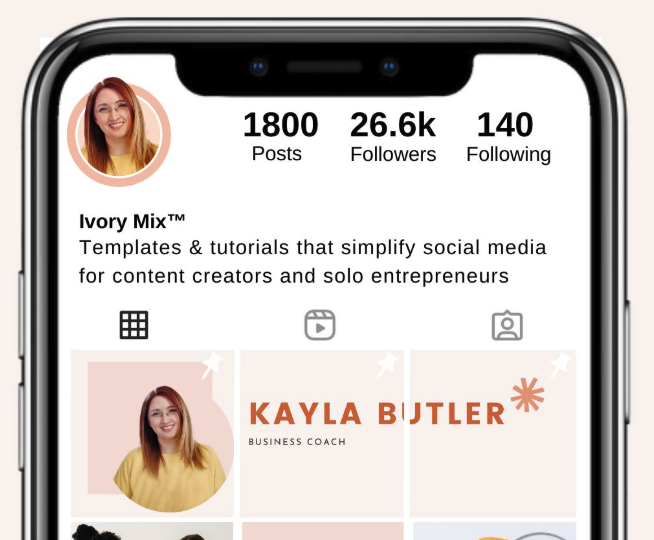
Ivory Mix sells templates and tutorials that help people with social media. So its own Instagram profile is part of the pitch. After all, if a social media brand got its profile wrong, why would you trust its advice?
The top row feels planned. It works like a shop window, built on purpose. Every pin matches the look of the brand. So a new visitor gets a feel for what they’d buy before reading a single caption.
That’s the lesson for any business. Your top row does the first bit of selling. So make sure it says what you’d want to say in person.
See Also