Practical Sales Training™ > How To Keep Your Clients Happy > Perceived Progress
Perceived Progress
A progress bar fills up smoothly. The system underneath might not be any closer to done. But you feel like it is, and that feeling is doing all the work.
That’s perceived progress. It’s not about speeding anything up. It’s about making the wait feel shorter than it actually is.
What Is Perceived Progress?
Perceived progress is the psychological technique of making people feel like they’re making progress, even when actual progress is minimal or artificially presented. It’s often used in loading screens, animations, and progress bars to reduce frustration and keep people engaged while they wait.
This concept is rooted in behavioural psychology and user experience design. The goal is to maintain attention and satisfaction, not necessarily to speed up the actual process. A progress bar that fills up smoothly, even before the system is ready, provides a sense of motion and reassurance.
Why Does It Work?
Perceived progress works by giving people visual or interactive cues that create the illusion of advancement. Progress bars, whether linear, circular, or creatively animated, reduce uncertainty even when they aren’t perfectly accurate.
Skeleton screens do something similar. Instead of a blank screen, an app shows greyed-out content areas to simulate loading, giving the illusion that content is already partially there. Animated transitions keep people visually occupied, signalling that something is happening behind the scenes.
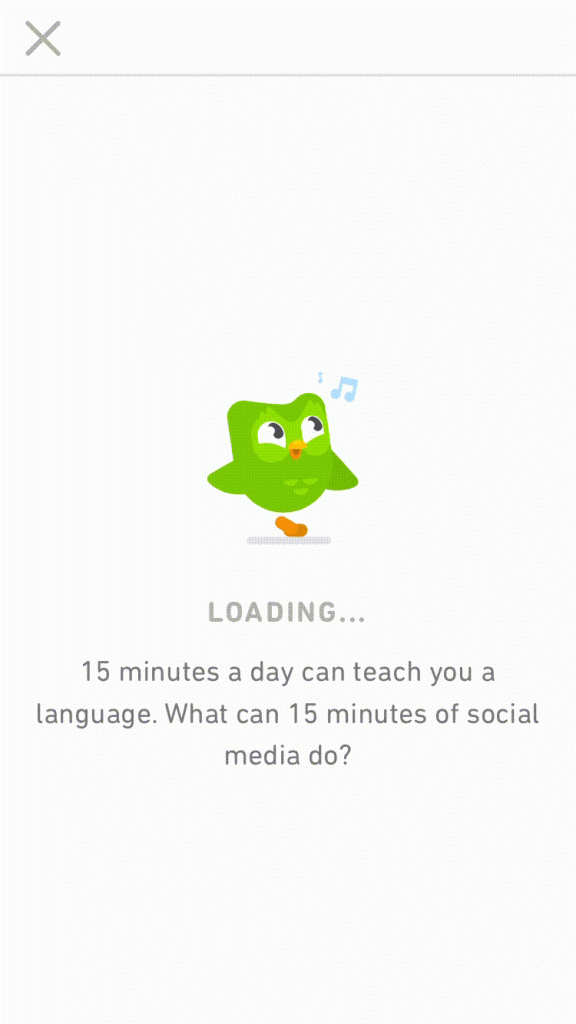
Loading messages or small facts help too. Brands like Duolingo, Slack and TurboTax use tips or humour to make wait times feel shorter. These mechanisms shift focus away from the delay itself and toward the experience surrounding it. When designed well, people may not even notice the wait.
How Can You Use Perceived Progress?
Use Animated Progress Indicators
Show that something is happening. Even a simple spinner or bouncing dots can reduce anxiety far more than a static, blank screen ever could.
Display Helpful Or Branded Messages
Use the waiting time to reinforce your brand personality, educate people, or entertain them with a small piece of content. A wait spent learning something feels shorter than one spent staring at nothing.
Break The Process Into Visible Steps
Showing stages, like “Uploading file… Processing… Complete,” makes a task feel more manageable and transparent. People trust a process they can see moving.
Use Skeleton Screens
If content is delayed, show placeholders that mimic the structure of the final output. It reassures people that data is genuinely on the way, not stuck.
Match Motion To Your Brand Style
Make animations and loaders feel like part of your brand, whether that’s playful, serious, or minimalist. A mismatched loading style can feel jarring, even if it works technically.
When It Works Best
Perceived progress works best on any delay you genuinely can’t eliminate, like file uploads, page loads, or processing tasks. It also performs well in apps and products people use daily, since a consistent, pleasant wait becomes part of the overall brand experience.
It’s especially effective when the wait time is short to moderate, since a well-designed loading experience can make a few seconds feel almost instant.
When It Becomes Dangerous
This becomes a problem if a progress bar is dishonest about genuinely long delays. A bar that reaches 90% instantly, then sits there for a full minute, damages trust more than an honest, slower-moving version ever would.
It also risks frustrating people if used to mask a process that’s actually broken. Perceived progress should smooth a real wait, not disguise a failure as one.
Common Mistakes
Making The Bar Jump Unrealistically
A progress bar that leaps to 95% then stalls feels worse than one that moves steadily and slowly. Match the visual pace to something believable, even if it’s not perfectly literal.
Using It To Hide A Genuine Problem
If a process has actually failed, a spinning loader just delays the moment someone realises something’s wrong. Show an honest error message instead of prolonging false reassurance.
Ignoring The Brand Fit
A playful, bouncy loader on a serious financial platform can feel out of place. Match your loading style to the tone your users expect from you elsewhere.
Perceived Progress – An Example
Loading Screens That Keep Boredom At Bay
Duolingo, along with several other apps, shares tips and small pieces of information on its loading screen to keep boredom at bay. Instead of staring at a blank spinner, a user reads something genuinely useful, and the wait barely registers as a wait at all.
See Also