Practical Sales Training™ > How To Lose The Sale > Mandatory Fields

Mandatory Fields
Mandatory fields are the parts of a form someone can’t skip. Each one demands an answer before the form will submit. So the more you add, the more effort it takes to finish.
Most buyers never count the fields consciously. But they feel the length of a form within seconds of landing on it. That instinct decides whether they start at all.
Why Does It Work
Every extra field asks something of the person filling it in. Even a phone number takes a moment of thought. That small cost adds up fast across a long form.
Friction compounds too. A form with two required fields feels quick, but a ten-field form feels like a chore. People abandon it partway through.
People also hesitate over fields that feel unnecessary. If a field seems unrelated to the task, buyers start wondering why you need it. That doubt slows them down.
How Can You Use It
Ask only for what you actually need right now
Cut any field that isn’t essential to complete the immediate action. You can always ask for more once the relationship starts.
Mark fields as optional wherever possible
Turn “nice to have” fields into optional ones. Most buyers skip them anyway. Those who don’t get a small sense of control.
Test a shorter version of the form
Try a version with the fewest fields possible and compare completion rates. The results usually make the case for cutting fields better than any argument would.
When It Works Best
This matters most at the very top of your funnel. A buyer hasn’t committed to you yet. That long form suddenly feels like a big ask. Trust is still too thin.
It also matters most on mobile, where typing is slower and more frustrating. Every mandatory field costs more attention on a small screen. Desktop feels far more forgiving.
When It Becomes Dangerous
Too many mandatory fields can quietly kill conversions without anyone noticing why. The form still works. It just stops getting finished, and nothing on the page explains that drop.
It also becomes dangerous when the fields feel invasive. A phone number on a newsletter signup can raise questions. Buyers wonder about your intentions before they’ve even read your offer.
Common Mistakes
Copying a form template without editing it
Default form builders often mark everything as required. Go through every field. Decide if it’s genuinely necessary, rather than accepting the defaults.
Requiring information you don’t actually use
Some fields exist out of habit, not real need. If nobody ever looks at that data, drop the field entirely.
Adding fields for internal convenience
A field that only helps your internal reporting isn’t worth the drop in completions. Weigh that convenience against the buyers you’ll lose collecting it.
Mandatory Fields – An Example
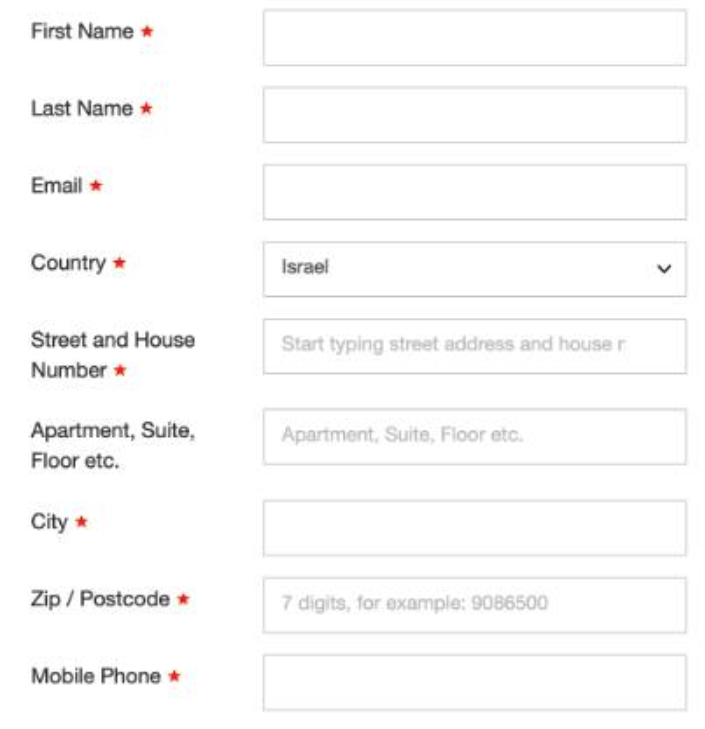
A checkout form with nine required fields
This checkout form asks for nine separate pieces of information. Each red asterisk marks another reason for a buyer to stop and think twice.
See Also