
Practical Sales Training™ > How To Convert > Order Edit Window
Order Edit Window
You’ve just paid for your order. Then you spot the thing you forgot. Maybe it’s a charger, a refill or a pudding for later. So now you face a choice. Either you start a whole new order, or you let it slide.
Most people let it slide. And each time, the seller loses an easy sale. That’s the gap an Order Edit Window closes.
An Order Edit Window gives your buyer a short spell to add to an order they’ve placed. It stays open until a cut-off. So the extra item rides along with the first one. Also, the hard part of buying is done. They’ve picked, paid and given an address. As a result, one more yes costs them almost nothing.
What Is An Order Edit Window?
An Order Edit Window is a set time after purchase. During it, your buyer can change their order. They can add items, swap them or bump up the amount. Then the window shuts. After that, the order goes out as it stands.
You’ll see it on food apps, with weekly food shops and at big online stores. But it works in B2B too. For example, a client might add two extra seats before a training day. Or they might add a second print run before the press starts.
The key part is the deadline. A clear cut-off gives your buyer a reason to look at the order now. So they act today instead of “one day”.
Why Does An Order Edit Window Work?
It works because your buyer has made the big call. They’ve said yes once. So adding to that yes feels like a small step. In fact, it barely feels like buying at all.
There’s also no fresh effort. The card, the address and the delivery slot carry over. As a result, saying yes again costs close to nothing.
Then there’s regret. Lots of buyers hit “pay” and then remember something. The edit window turns that “oh no” moment into a quick fix. So your add-on feels like help. And help is far easier to accept than a pitch.
Finally, the deadline adds a gentle push. People act faster when a door is about to close. And they’d rather add the item now than kick themselves later.
How Can You Use An Order Edit Window?
Here’s how to set one up so your buyers use it.
Tell Them The Window Exists
Your buyer can only use a window they know about. So tell them straight after they pay. Put it on the thank-you page and in the order email. For example, “You can still add to this order until 8pm tonight.” That one line does a lot of work.
Make The Cut-Off Clear
A clear cut-off gets people moving. Give a real time, or better still, a countdown. Phrases like “shortly before dispatch” mean little to a busy buyer. With a clock on screen, they know how long they have. So the clock does the nudging for you.
Suggest The Thing That Finishes The Job
The best add-on completes what they bought. Batteries with the toy. A dip with the chips. Extra seats for the new starter who joins next week. So pick the item they’d kick themselves for missing. That feels like you read their mind.
Make Editing Easier Than Starting Again
If adding an item takes six screens, people won’t bother. They’ll shrug and move on. So keep it to one tap from the order page or the email. In fact, easy edits lead to bigger baskets.
Use It In B2B Too
The same idea works on big deals. Say a client has signed for a project that starts in two weeks. Give them a set date to add scope, users or extra sessions. Since they’ve signed the contract, the extra spend moves faster. Also, it often lands with the same budget holder who said yes first.
Let Them Fix Mistakes As Well
Let buyers change sizes, swap items and fix their address inside the window too. That cuts returns and support calls. Also, a buyer who can fix things easily trusts you more. And trust is what makes the next add-on feel safe.
When Does An Order Edit Window Work Best?
It works best when orders are small, frequent and travel together. Food delivery, weekly shops, office supplies and online stores all fit well. The add-on rides with the first order, so the buyer feels no extra hassle.
It also shines when buyers forget things a lot. Think of weekly shops, school kit or event supplies. In these cases, the window catches gaps before they become an order with a rival.
And in B2B, it works well before a fixed start date. That might be a kick-off, a print run or a renewal. Before that point, changes cost you little. After it, they cost a lot.
When Does An Order Edit Window Become Dangerous?
It gets risky when your back office can’t keep up. If your team has packed the order, a late change causes errors and delays. So set the cut-off where your team can still act.
It also backfires when the window feels like a trap. Constant “add more?” messages wear people down. As a result, they start to ignore you, or worse, unsubscribe.
Watch out for price changes too. If a price rises during the window, the buyer feels tricked. So hold the price they saw when they first paid.
Lastly, an edit window cuts both ways. Buyers can trim an order as well as grow it. That’s fine, and you should allow it. But track it. Lots of cuts tell you something is off with your offer.
What Are The Common Mistakes With An Order Edit Window?
Most edit windows fail for simple reasons. Here are the ones I see most.
Hiding It In Small Print
Some sellers offer the window but bury it in the order terms. So nobody uses it. Instead, show it big and early, right where the buyer looks after paying.
Leaving The Deadline Vague
“Before we ship” tells the buyer nothing useful. As a result, they put it off and the window closes. So give a clear time and remind them once before it shuts.
Pushing Random Add-Ons
Showing your best seller to everyone feels lazy. Also, it breaks the “helpful fix” feeling that makes the window work. So match the suggestion to what they just bought.
Making Edits Harder Than A New Order
If editing means logging in, finding the order and typing card details again, people quit. In fact, some just buy elsewhere. So keep the whole thing to one or two taps.
Forgetting To Confirm The Change
After an edit, buyers want proof. Send a fresh summary with the new total and the delivery time. Otherwise, they worry the change didn’t stick and call support anyway.
Order Edit Window – An Example
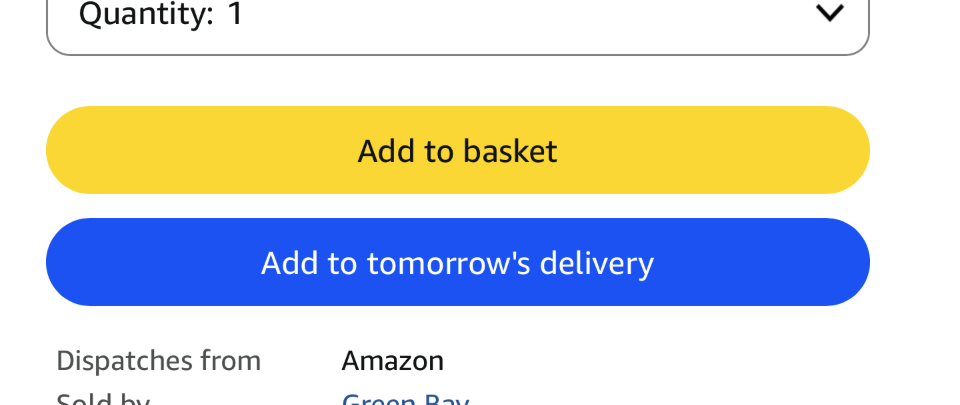
Amazon: Add To Tomorrow’s Delivery
Amazon is a great example. Look at an item, and it may offer to add it to a delivery you’ve got coming. So it rides along.
Think about what that does to the choice. Topping up a parcel feels tiny next to starting a new order. And the van is coming anyway, so why not?
There’s a deadline built in too. The offer only works while the delivery can still take the item. So it nudges you to decide now, while the thought is fresh. That’s the whole concept in one small prompt.
See Also

