Practical Sales Training™ > How To Get Attention > Timestamps

Timestamps
You post a 40 minute webinar. A buyer clicks it, watches eleven seconds, and closes the tab. Not because your content is weak. Because they had no idea if their answer was in there.
That’s what timestamps fix. They’re the clickable markers under a video that let someone jump straight to the bit that matters to them.
What Is It
A timestamp is a marked point inside a video. Click it, and the video jumps there instantly. You’ve seen the list under a YouTube video, each line linked to a moment in the timeline.
On a sales video, a timestamp isn’t just navigation. It’s a preview. It tells the buyer what’s coming, and when, before they commit a single minute to finding out.
Why Does It Work
Buyers don’t watch sales videos the way they watch entertainment. They watch to solve a problem. So the moment they can’t tell if the answer is coming, they leave.
Timestamps remove that uncertainty. A buyer scans the list, spots the line that matches their worry, and clicks. Now they’re watching with intent, not hope.
There’s a trust effect too. A list of timestamps says “I respect your time enough to map this out.” That’s rare. Most sales videos just assume you’ll sit through the whole thing.
How Can You Use It
Label the objection, not the topic
Most timestamp lists read like a table of contents: “Introduction,” “Our Process,” “Pricing.” Nobody clicks a table of contents. Instead, write each timestamp as the question a buyer is actually holding in their head. “Why this costs more than the cheaper option” gets clicked. “Pricing” doesn’t.
Put your strongest proof early in the list
You don’t have to timestamp in the order the video was recorded. If your best objection killer sits at minute 22, list it second or third anyway. A skimmer decides whether to trust the rest of the list within seconds, so lead with the line most likely to make them think “wait, they get it.”
Reuse them as follow-up ammunition
After a call, don’t just send “here’s the recording.” Send the exact timestamp for the moment you answered their specific concern. It shows you were listening, and it means they never have to hunt for the part that convinces the other decision maker.
Use the list itself as a pre-sell
Someone who never presses play still reads the timestamp titles. That’s five or six headlines stacked in a row. Write them so the list alone makes the case, even for the buyer who only skims and never watches a second of footage.
When It Works Best
Timestamps earn their place on anything long. Webinars, demo recordings, sales page videos, and onboarding walkthroughs all benefit, since the buyer usually wants one section, not the whole thing.
They also help after a sales call. Send the recording with timestamps and the buyer can revisit the exact moment that mattered instead of scrubbing through forty minutes to find it.
When It Becomes Dangerous
Timestamps can turn into an excuse for a bloated video. If you find yourself timestamping past the twelve minute mark just so people can skip the boring bits, the real fix is cutting the boring bits.
They can also undercut your own persuasion sequence. If you build trust and credibility early in the video before revealing price, a timestamp list that lets buyers jump straight to “pricing” skips the exact part designed to make that price feel fair.
Common Mistakes
Writing internal labels instead of buyer language
Teams timestamp using their own internal names for things, like “Phase 2” or “Module B.” Buyers don’t think in your language. They think in their own problem. Translate every label into something they’d type into a search bar.
Letting the list go stale
You re-record the video, tighten the pitch, and move the pricing section ten minutes earlier. The old timestamps still point to the wrong spot. A buyer who clicks a broken timestamp doesn’t blame the timestamp, they blame you for wasting their time.
Adding too many
Ten or twelve timestamps stop being a shortcut and start being a menu nobody can scan. Six or seven strong ones beat a dozen weak ones, because the buyer needs to make a fast decision, not study a spreadsheet.
Timestamps – An Example
My own webinar breakdown
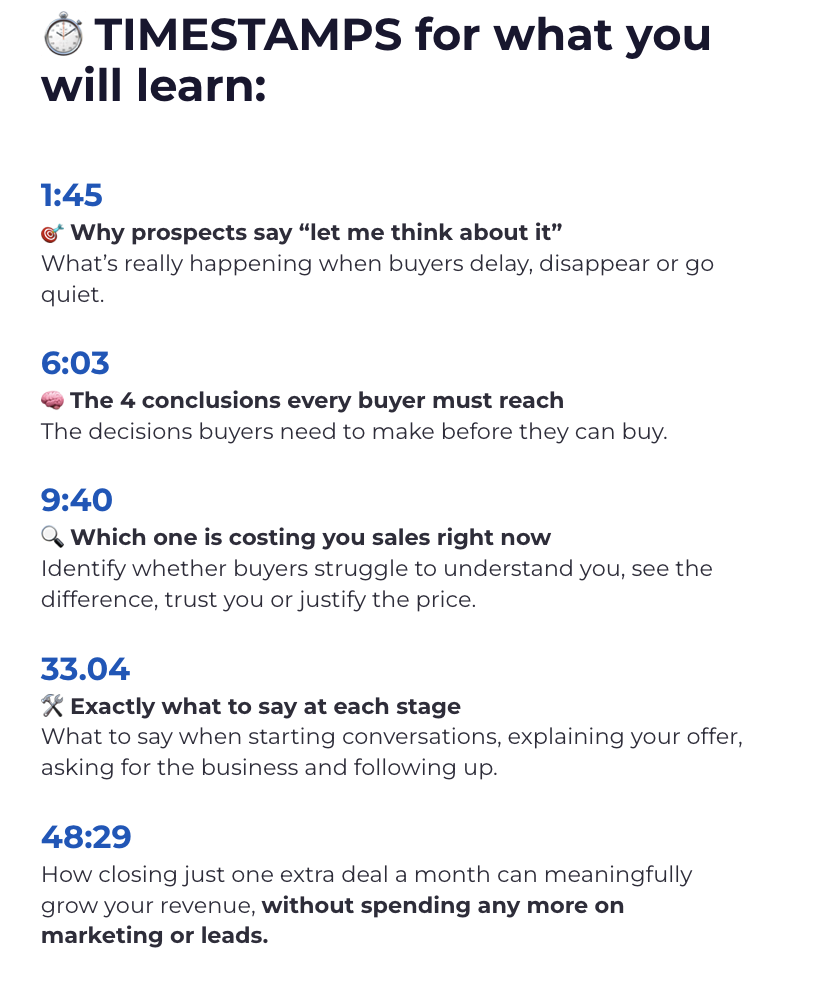
On my own What To Say To Sell™ webinar, I list exactly what someone will learn and exactly when it happens. That way they know within seconds if it’s worth their time.
Notice the labels aren’t “Section One” or “Introduction.” Each one names the actual worry a buyer has, so a skimmer can match their own situation to a line in seconds and click straight to it.
See also