Practical Sales Training™ > How To Get Attention > Interactive Social Posts
Interactive Social Posts
Most people scroll past your post in under a second. In fact, their thumb moves faster than their brain. So if your post asks for nothing, it gets nothing.
But give them a small job to do and the scroll stops. A zoom, a tap, a swipe. Suddenly they’re taking part. And people pay far more attention to things they take part in.
What Are Interactive Social Posts?
Interactive Social Posts ask people to do something to get the full message. They might zoom in to read tiny text. Or they swipe, tap or hold the screen. The key part of the message stays hidden until they act.
A normal post hands everything over at once. You look, you get it, you move on. In contrast, an interactive post holds something back. So the reader has to lean in and earn it.
And that small bit of effort changes how people see your post. It turns a glance into a game.
Why Do Interactive Social Posts Work?
First, they break the scroll pattern. Most posts look and act the same, so people’s thumbs run on autopilot. But a post that asks you to do something feels different. That tiny jolt is often enough to make someone stop.
Next, they open a gap. When you see a hint of a message, your brain wants the rest. In fact, an unfinished message nags at people. So they zoom or swipe just to close the loop.
They also make people feel smart. Finding the hidden bit feels like a small win. As a result, people remember the message better. After all, they found it themselves.
The platforms notice as well. When people stay on a post longer, it tells the platform your post is worth their time. So you may reach more people too.
How Can You Use Interactive Social Posts In Sales?
You don’t need a big budget for this. Here are a few ways I’d use it.
Hide Your Key Point In Plain Sight
Put your main message somewhere people have to look for it. Tiny text in a corner works well. So does a detail in a busy image. Then add a short prompt like “zoom in” so people know there’s a prize. Without that nudge, most will miss it.
Use Carousels To Build Tension
A carousel is a story you can swipe through. So treat each slide like a cliffhanger. Start with the problem your buyer feels. Then hold the answer back until the last slide. Each swipe pulls them deeper into your idea.
Make The Reveal Match Your Offer
The hidden part should link back to what you sell. For example, if you fix hidden costs, make people hunt for a hidden number. The act of looking then mirrors your buyer’s problem. As a result, the point lands before you even explain it.
Ask For A Choice, Not Just A Look
Polls and “pick one” posts work well too. Ask your buyer which problem hurts most. Their answer tells you what to talk about next. Also, once someone picks a side, they want to see if they were right. So they come back for the follow up.
When Do Interactive Social Posts Work Best?
They work best when you have one clear thing to share. A launch date, a big number or a sharp idea all fit well. The reveal gives that one thing extra weight.
They also shine in busy feeds. If your buyers see the same kind of post all day, anything that moves stands out. So invite them to play.
And they suit teasers. Building up to an event, a launch or a price change? Hiding part of the news makes people curious. That curiosity keeps them looking out for the next post.
When Do Interactive Social Posts Become Dangerous?
They turn risky when the reveal isn’t worth the effort. If someone zooms in and finds nothing much, they feel let down. Worse still, they learn to ignore your next post. So only hide something good.
They can also lock people out. Some people use screen readers, or view posts on small or slow screens. If your key message only shows up after a zoom, those people may never see it. So put it in the caption too.
And they can get too clever. If people can’t work out what to do, they give up. A confused buyer doesn’t dig deeper. They just scroll on.
Common Interactive Social Post Mistakes
I see the same slip-ups again and again with these.
Hiding The Wrong Thing
Some people hide a joke and leave the offer in plain view. That flips the value. Hide the part people care about most. Then the effort feels worth it, and the key point sticks.
Forgetting The Prompt
People won’t zoom or swipe if they don’t know there’s a reason to. A short cue like “zoom in” or “swipe for the answer” fixes this. It sounds too simple to matter. Yet it’s often the difference between a post that works and one that flops.
Using The Trick Every Time
The first time, it’s fun. By the tenth, it’s a chore. Your buyers will start to see the pattern and skip it. So save it for news that deserves the extra effort.
No Next Step After The Reveal
You’ve got their full attention right after the reveal. That’s the best moment to ask for something. So tell them what to do next, like sign up, book or save the post. Otherwise, you win attention and waste it.
Interactive Social Posts – An Example
Meta Asks You To Zoom In
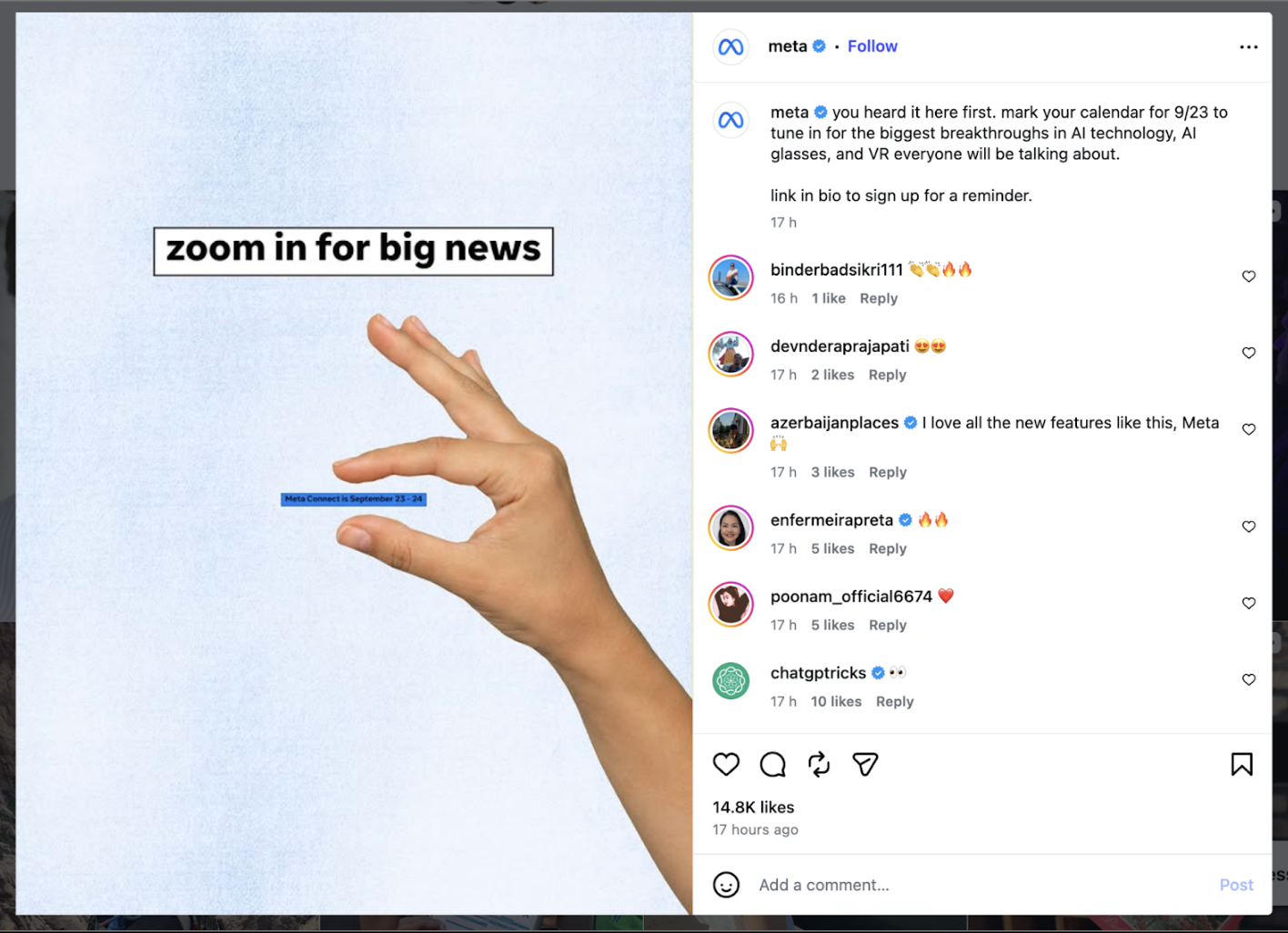
This Meta post is a neat one. Instead of shouting the news, it asks you to zoom in and find it yourself.
That one line of instruction does all the work. It tells you there’s a prize. Better still, it shows you how to get it. So your thumb stops, your fingers spread, and suddenly you’re taking part.
And look at what they chose to hide. It’s the one detail they most want you to remember. Because you had to hunt for it, it sticks. Then the caption closes the deal with a clear next step to sign up for a reminder.
You can do the same with a small budget. Pick your one key detail and make people reach for it. Then tell them exactly what to do once they’ve found it.
See Also