Practical Sales Training™ > How To Convert > Pre Call Emails
Pre-Call Emails
People book calls with good intentions. But life gets in the way. By the time the meeting arrives, the original excitement has faded and the diary is full of other things. So they skip it. Or they forget entirely.
A pre-call email fixes that. It is a short, well-timed message sent before a scheduled call to remind the buyer why they booked, confirm the details, and make showing up feel easy. It is one of the simplest conversion tools available. And most people either skip it or do it badly.
Done well, it does not just reduce no-shows. It warms the buyer back up before you have even said a word.
What Is a Pre-Call Email?
A pre-call email is a short message sent to a buyer before a scheduled meeting or sales call. Its job is to confirm the details, rebuild momentum, and give the buyer a reason to show up ready to talk.
It is not a chaser. It is not a nag. Done right, it feels helpful rather than pushy. It reminds the buyer of what they are getting from the call, not just when it is happening.
Most booking tools like Calendly send a basic confirmation. But a pre-call email goes further. It adds warmth, context, and value. As a result, the buyer arrives engaged rather than vague.
Why Do Pre-Call Emails Work?
When someone books a call, there is energy in that moment. They are curious, interested, and ready to talk. But that feeling does not last. A day or a week later, it has faded. The pre-call email brings it back.
It also re-establishes commitment. When a buyer reads your reminder and clicks the link, they have made a small active choice to show up. That matters. It shifts them from passive to engaged before the call even starts.
There is a positioning benefit too. A well-written pre-call email signals that you are organised, clear, and worth talking to. So before you have opened your mouth, you have already made a good impression.
How Can You Use Pre-Call Emails In Sales?
Send one 24 hours before the call and another a couple of hours before it starts. Keep each one short. The goal is to make showing up feel easy and worthwhile, not to overwhelm the buyer before they have even spoken to you.
Confirm the Details
“Looking forward to our call tomorrow at 10am. Here’s the link.” Simple and clear. No hunting for the original booking confirmation. You have made it easy, which means there is one less reason not to show up.
Reinforce the Value
“We’ll cover three quick ideas to help you improve your sales message.” This reminds the buyer what they signed up for. It also rebuilds the original interest that drove them to book in the first place.
Set Expectations
“It would help to have a rough idea of your goals before we start.” A short prompt like this gets the buyer thinking ahead of the call. They arrive prepared, which makes the conversation sharper and more useful for both sides.
Make It Easy to Reschedule
Include a reschedule link. If the buyer cannot make it, you want them to move it, not ghost it. Giving them an easy way out actually increases the chance they stay in. It removes the awkwardness of telling you they need to change.
Make It Feel Personal
Write it like a human, not a system. Use their name. Reference something specific. A message that feels like it was written for them gets read. A template that looks like it went to a thousand people gets ignored.
When Pre-Call Emails Work Best
They work best when there is a gap between booking and the call itself. The longer the gap, the more important the reminder. A call booked a week out needs more support than one booked for tomorrow afternoon.
They also make a big difference for cold or warm prospects who do not yet know you well. An existing client will probably show up regardless. But a new prospect who booked on a whim needs a reason to follow through. The pre-call email gives them that reason.
For high-value calls, they are non-negotiable. When a no-show costs you a real opportunity, a two-minute email to protect that slot is always worth sending.
When Pre-Call Emails Become Dangerous
They become a problem when they feel automated and cold. A generic “this is a reminder of your upcoming appointment” does very little. It confirms the time but adds no warmth and rebuilds no interest. The buyer still shows up flat, if they show up at all.
Sending too many is also a risk. One the day before and one on the morning is enough. Any more and it starts to feel like chasing, which creates the wrong impression before the call has even started.
However, the biggest mistake is using the reminder as a box to tick rather than a tool to use. A pre-call email is a sales touchpoint. It should do real work, not just confirm a time.
Common Pre-Call Email Mistakes
Sending Nothing at All
Relying on the original booking confirmation is not enough. That email was sent days ago and is now buried. Send your own reminder. Take control of the touchpoint rather than leaving it to a calendar notification.
Making It All About You
A reminder that focuses on your process, your agenda, and your preparation misses the point. The buyer wants to know what they get from showing up. So lead with their benefit, not your checklist.
Using Robotic Language
System-generated language kills momentum. “Your appointment is confirmed for the following date and time” sounds like an out-of-office. Write it like a person. Because that is what gets read and remembered.
Forgetting the Link
If the buyer has to hunt for the Zoom link or dial-in details, some of them will not bother. Put the link front and centre in every reminder. Remove every possible reason not to show up.
Pre-Call Emails – An Example
I use pre-call emails for every discovery call booked through my Calendly. The moment someone books, they get a confirmation. Then they get a reminder 24 hours before the call and another two hours before it starts.
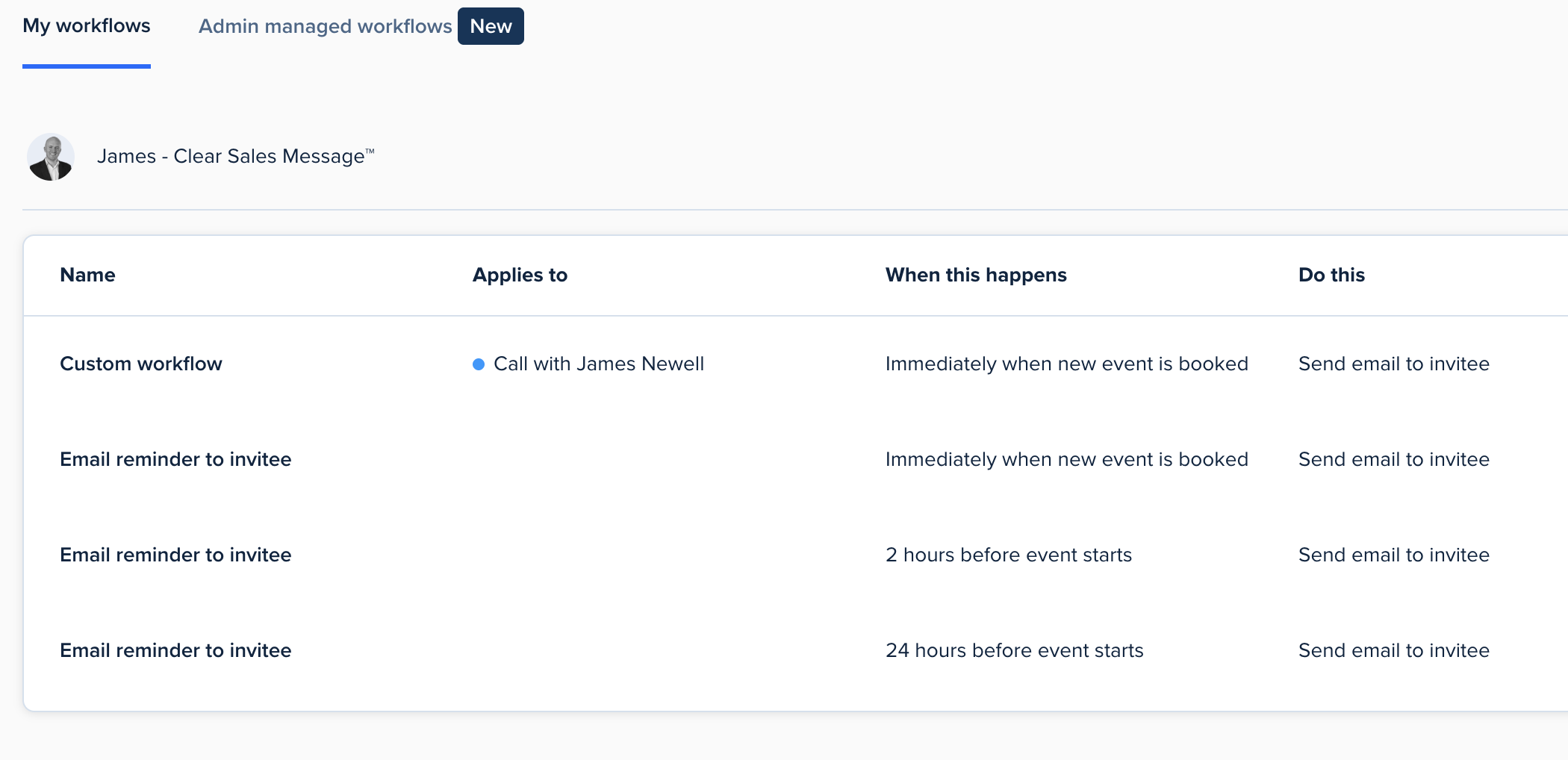
The screenshot shows the Calendly workflow behind it. Three automated emails, all triggered at different points before the call. It takes about ten minutes to set up and it runs itself from there.
No-show rates drop. Buyers arrive warmer. And the calls themselves are better because the buyer has had a chance to think about what they want to cover. That is a lot of return for a very small effort. So if you are not doing it yet, start today.
See Also
- 180+ ways to improve conversion
- 140+ ways to be easier to buy from
- 150+ ways to connect with your buyer
- Online calendars