Practical Sales Training™ > How To Convert > Guest Checkout

Guest Checkout
What Is It
Guest Checkout lets someone buy without creating an account first. They enter what’s genuinely needed to complete the purchase, and nothing more.
The option to sign up still sits there. It just isn’t forced. Buying and joining stay two separate decisions, instead of one bundled together.
Why Does It Work
Checkout is the exact moment a buyer’s motivation is highest and their patience is thinnest. Anything that adds a step right there risks losing them, and creating a password, choosing a username, or confirming an email is exactly that kind of unwanted step.
It also changes how the request feels. Being asked to create an account before you’ve even paid reads as the business caring more about future marketing than making this one purchase easy. Guest Checkout removes that impression entirely.
Plenty of cart abandonment happens for this reason alone. Someone is ready to pay, hits a forced sign up wall, and simply leaves rather than commit to a relationship they never asked for.
How Can You Use It
Put Guest Checkout Above The Account Options, Not Below
Don’t bury it under a sign in form as an afterthought. Give it equal or greater visual weight, so it reads as a genuine, encouraged choice rather than something a buyer has to hunt for after already trying and failing to sign in.
Offer Account Creation After The Purchase, Not Before
Ask once the order is already confirmed and paid for, not before. At that point the buyer has nothing left to lose by saying yes, and offers like saved details or order tracking land far better once the sale itself is already secure.
Never Disguise It As Optional When It Isn’t
If a “guest checkout” quietly still creates an account behind the scenes, or still adds someone to a marketing list without saying so, that’s worse than never offering it at all. Make sure the option genuinely means what it says.
When It Works Best
This works best with first time buyers and anyone with no existing relationship with the business, since trust hasn’t been earned yet to justify asking for more. It also matters most on mobile, where typing out account details is genuinely painful compared to a desktop.
When It Becomes Dangerous
It becomes a problem if it’s used to avoid ever building a real customer relationship. Repeat buyers are valuable, and a business that never invites anyone to save their details loses out on that long term relationship entirely.
It’s also risky if guest orders aren’t tracked properly at all. A buyer who can’t look up their own order later, because nothing was saved anywhere, ends up more frustrated than if they’d just made an account in the first place.
Common Mistakes
Making The Guest Option Hard To Find
If someone has to scroll past a sign in form, a forgotten password link and a “create account” button before spotting the guest option, most people won’t bother looking. It needs to be immediately visible, not a hidden fallback.
Still Asking For A Password Just In Case
Some guest checkouts quietly still ask buyers to set a password “for their records.” That single field undoes the entire point, since it’s the exact commitment guest checkout was meant to remove.
Never Following Up With A Simple Account Invite Afterwards
Once someone has paid as a guest, a single, simple offer to save their details for next time costs nothing and often gets accepted. Skipping that step entirely leaves value on the table for no real reason.
Guest Checkout – An Example
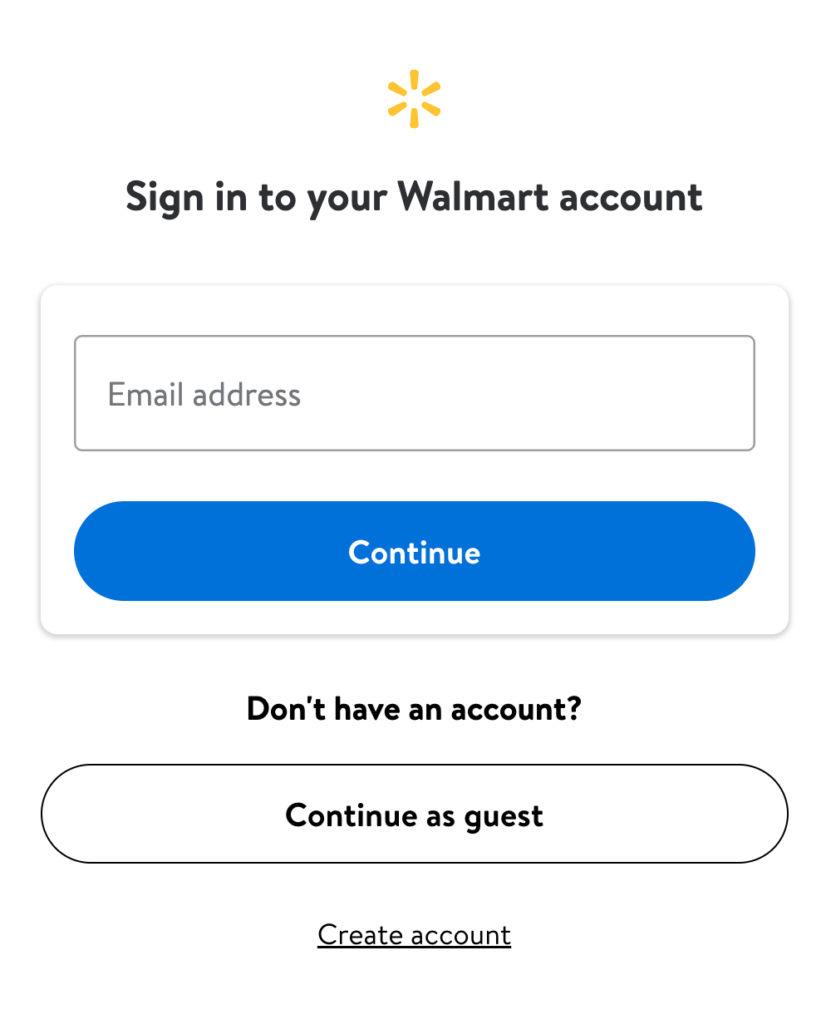
It doesn’t get much clearer than Walmart’s sign in screen. Right underneath the usual email sign in box sits a plainly labelled “Continue as guest” button, given just as much visual weight as the account options above and below it. Nobody has to hunt for the option or feel like a second class choice for taking it.
See also: