Practical Sales Training™ > How To Lose The Sale > Broken Links

Broken Links
A buyer clicks a link expecting one thing. A download. A booking page. A proof point that backs up what you just told them. But instead, they land somewhere else entirely, or nowhere at all.
That’s a broken link. It might look small from where you’re sitting, but to the buyer, it raises a real question. If this doesn’t work, what else on this page doesn’t work either?
This page covers what counts as a broken link, why it does so much damage to trust, and how to stop it happening in the first place.
What Is A Broken Link?
A broken link happens when a buyer clicks expecting to reach something, information, a booking page, proof, a purchase, and instead hits an error, a missing page, or the wrong destination entirely.
Sometimes that’s an obvious 404. Sometimes it’s an expired calendar link, a removed download, or a redirect that sends the buyer somewhere unrelated to what was promised. The link still works, technically. It just doesn’t take them where it should.
From a technical view, this is a small fault. But from the buyer’s side, it raises a bigger question about how dependable you really are. So if the next step doesn’t work, their confidence starts to slip straight away.
Why Does A Broken Link Lose The Sale?
Buying decisions rely on things feeling continuous. Each step should reassure the buyer that progress is smooth and that they’re in control of the process.
When a link fails, that continuity breaks. The buyer suddenly has to decide whether to retry, search manually, come back later, or just give up. Most people pick the easiest option, which is usually to stop.
More importantly, a broken link creates doubt. It suggests outdated information or a lack of attention behind the scenes. So even if the offer itself is strong, credibility takes the hit instead.
The sale rarely fails because someone got frustrated. Instead, it fails because momentum disappears and trust quietly drops with it.
This isn’t just a feeling either. Research into user experience shows that website errors are a measurable cause of people leaving without buying, with 17% of online shoppers naming website errors or crashes as a direct reason for abandoning a purchase. (Source: Contentsquare Digital Experience Benchmarks)
How Can You Avoid Broken Links In Sales?
Test Buyer Pathways Regularly
The most important links are the ones tied to action: booking pages, payment links, proposals, downloads, and contact routes. Check them often, and check them from the buyer’s side, not just your own.
Treat Links As Part Of The Sales Process
A link isn’t an admin detail. It’s an active conversion point. Every click is a buyer showing intent, so that intent should never run into friction. Maintaining links deserves the same care as your messaging or pricing.
Update Redirects When Pages Change
Content moves on, but old links keep circulating through emails, social posts, search results, and shared chats. Redirecting retired pages protects all the marketing effort that’s already out there.
Check Your Automated Systems
Calendar tools, downloads, gated content, and integrations can fail quietly, with no warning and no error message. So check them often, because a tool can break without you ever knowing.
Give Buyers A Way Back
Even with good upkeep, errors still slip through sometimes. Clear navigation, a working contact option, or a helpful fallback page lets buyers carry on instead of just leaving.
When Broken Links Cause The Most Damage
They hurt most at high-intent moments, the exact point where a buyer is ready to act. A broken link on a casual blog post barely registers. A broken link on a download button, a booking page, or a checkout step lands at the worst possible time, right when someone was about to say yes.
They also do more damage the further a buyer has come. Someone who has read your page, trusted your pitch, and clicked through to take the next step has invested more than someone just browsing. So when that step fails, the drop in trust is bigger too.
When Broken Links Become Dangerous
The most dangerous broken links are the quiet ones, the ones that don’t look broken at all. A 404 page at least tells the buyer something’s gone wrong. A link that loads but leads somewhere unrelated gives no warning at all, so the buyer just feels confused instead of informed.
That confusion does more harm than an obvious error, because the buyer now has to work out for themselves that something’s wrong on your end. Most won’t bother. They’ll just leave, quietly assuming the whole thing wasn’t properly set up.
Common Broken Link Mistakes
Launching An Offer Before Testing The Automation
A lead magnet button or download link often gets built last and tested least. If you haven’t finished the automation behind it, the link can look fine while sending buyers somewhere completely wrong.
Assuming A Working Link Stays Working
Tools update, accounts expire, and integrations quietly break. A link that worked perfectly last month can fail today with no warning at all.
Never Testing From The Buyer’s Side
Checking a link while logged into your own systems hides the exact problem a buyer would hit. Always test the journey the way a stranger would experience it.
Broken Links – An Example
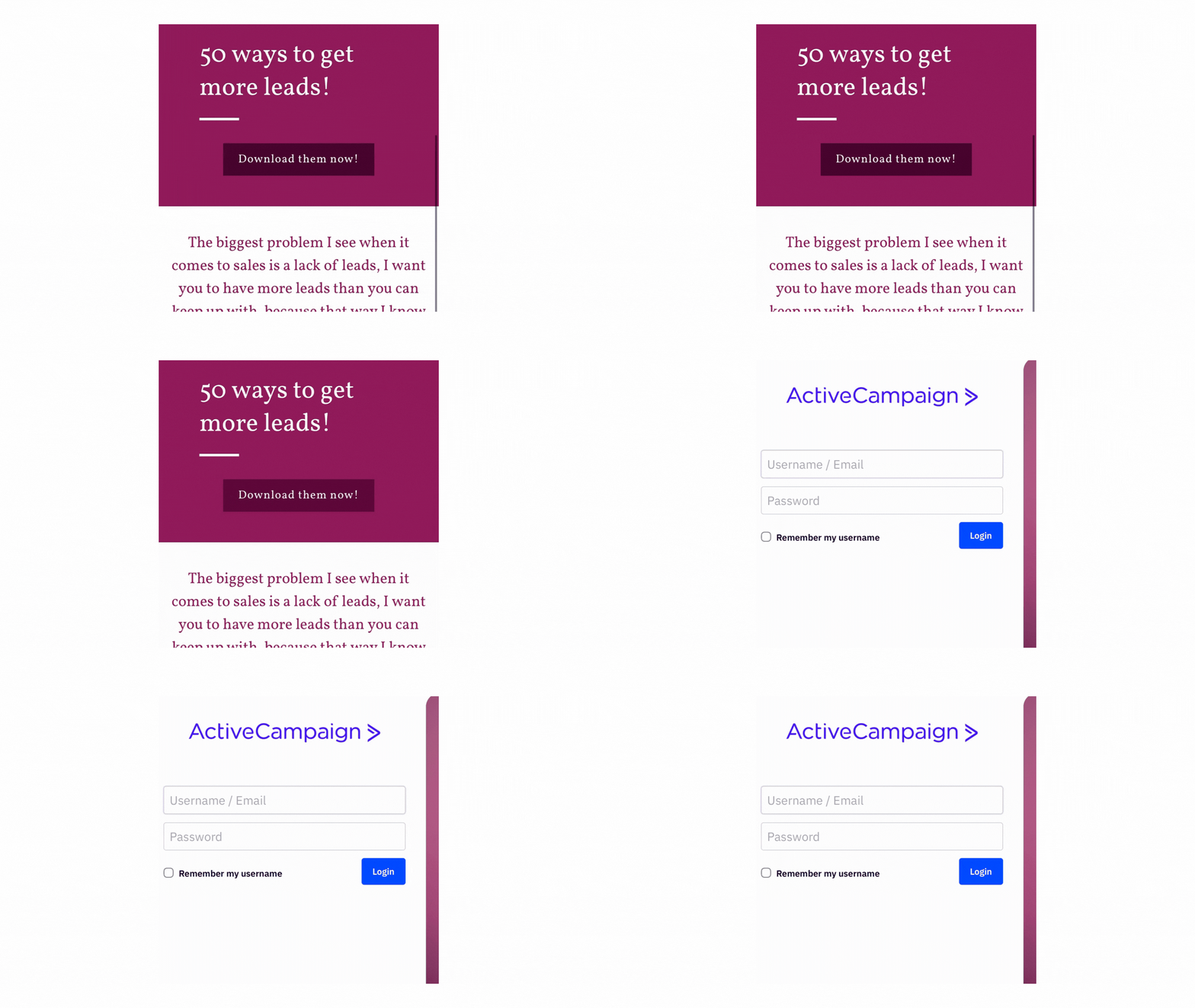
A lead magnet promises “50 ways to get more leads,” with a clear “Download them now!” button sitting right under the headline. It looks finished. It looks ready to go.
But click the button, and instead of a download, it lands on an ActiveCampaign login page. Nobody finished the automation behind the lead magnet, so the link technically works, it just sends the buyer somewhere they’ve never heard of and have no reason to trust.
That’s what makes this kind of broken link so damaging. There’s no error message telling the buyer something’s wrong. They just see a login screen for a tool they don’t recognise, and quietly decide the whole offer wasn’t worth their time after all.
See also: