Practical Sales Training™ > How To Get Attention > Preview Text

Preview Text
Most salespeople spend time on the subject line and ignore what comes next. But the preview text sits right next to it in the inbox. It’s the second thing people read before they decide to open or delete.
So if your subject line hooks them, the preview text can close the deal. And if your subject line is weak, good preview text can still rescue the open. Because both lines work together, getting them right doubles your chance of a yes.
It’s a small detail. But small details decide whether your email gets read or gets binned. Therefore, it’s worth treating preview text as seriously as the subject line itself.
What Is Preview Text?
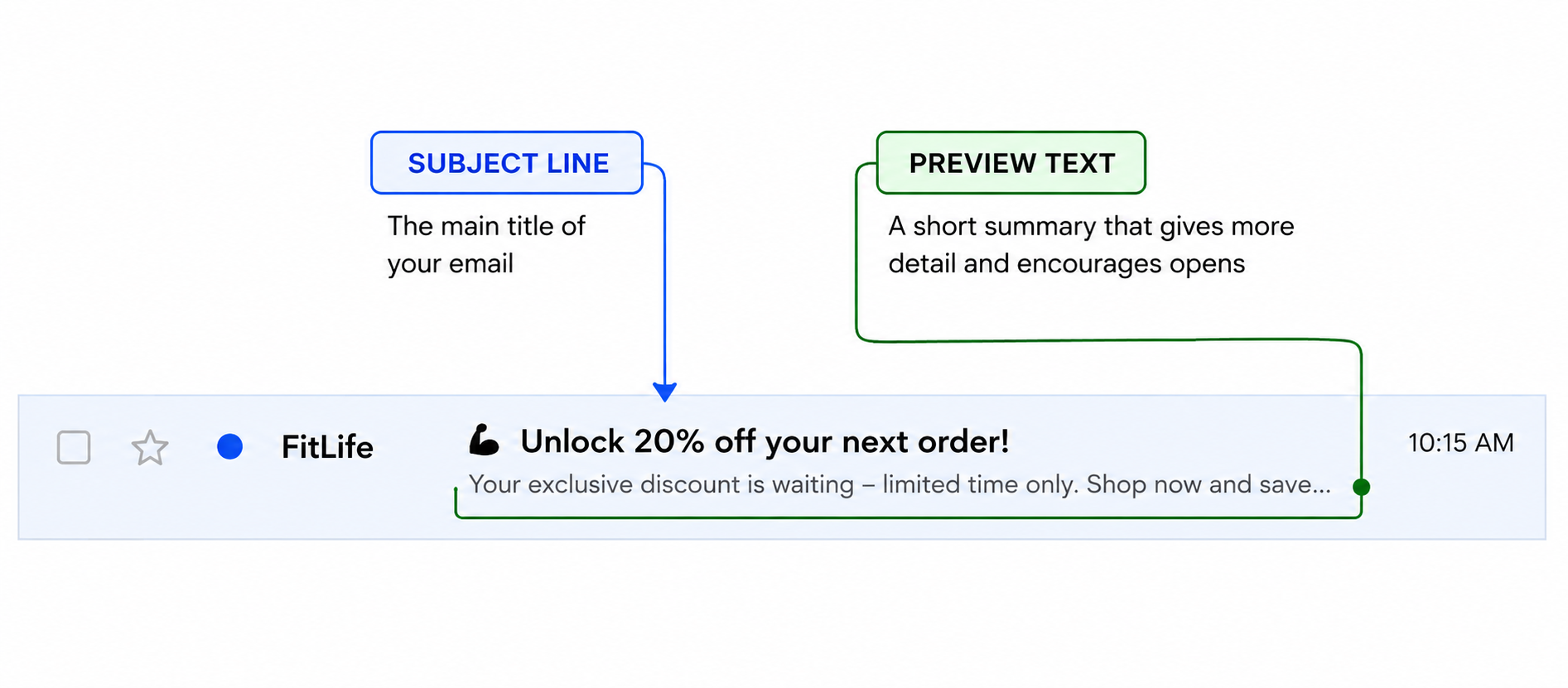
Preview text is the short snippet that appears in an email inbox, just after the subject line. Most email clients show it – Gmail, Outlook, Apple Mail, and most mobile apps all display it. So almost everyone your email reaches will see it.
It’s sometimes called the preheader. However, the idea is simple: it gives the reader a bit more context before they open. Think of it as a subtitle for your email. The subject line is the headline. The preview text is the line that makes them want more.
If you don’t write preview text, the email client will pull the first line of your email instead. That’s often something like “If you can’t see this email, click here” – which is not a great reason to open. So leaving it blank is a missed opportunity every single time.
Why Does Preview Text Work?
Because people scan their inbox fast. They’re not reading every subject line in full. They’re making quick yes/no calls on what to open and what to skip. So any extra information you can give them helps tip the balance.
Preview text gives you a second shot at the yes. The subject line grabs attention. The preview text adds a reason to act. Together, they work like a one-two punch – and also like a short sales pitch delivered before the email even opens.
It also works because it feels low-effort to the reader. They don’t have to open the email to get more context. Instead, the preview text delivers it right there in the inbox. So it removes a small barrier and makes opening feel easy.
In fact, studies consistently show that optimised preview text increases open rates. Therefore, it’s one of the cheapest wins available in any email sales sequence.
How Can You Use Preview Text In Sales?
There are a few clear ways to make your preview text work harder. For example, you can use it to add a benefit, spark curiosity, or build urgency – all before the email opens.
Add a specific benefit
Your subject line might say “Following up on our call.” So the preview text can add “Here’s the one thing that could save you six hours a week.” The subject line sets the context. The preview text gives them a reason to care. Because it’s specific, it lands harder than a vague teaser.
Create a curiosity gap
Start a thought in the subject line and continue it – but not quite finish it – in the preview text. For example, subject: “The mistake most buyers make.” Preview: “It usually costs them more than they think…” Because the thought is incomplete, they open to find out how it ends.
Use social proof or urgency
Preview text is also a good place for a fast credibility hit. “47 clients saw results in the first month” or “Only 3 slots left for June” can tip the balance. However, keep it honest – false urgency backfires fast and damages trust.
Ask a question
A short, relevant question can pull people in. “Still spending half your day on follow-ups?” speaks directly to a pain. Because it feels personal, it gets opened. Similarly, a question that names a specific problem gets far more traction than a generic one.
When Preview Text Works Best
Preview text works best when it connects clearly to the subject line. They should feel like two parts of one thought – so the reader gets a natural flow from one to the next, not two separate ideas fighting for space.
It also works best when it’s specific. “You’ll love this” tells them nothing. Instead, “Cuts your onboarding time in half” tells them exactly why to open. Therefore, specificity is always the better call.
Similarly, it performs well on mobile. Mobile inboxes often show more preview text than desktop. So if your audience reads email on their phone, preview text is even more important to get right.
When Preview Text Becomes Dangerous
Preview text becomes a problem when it makes a promise the email doesn’t keep. For example, if the preview says “Something big is coming your way” and the email is a routine update, trust drops. People feel tricked. And they remember it next time your name appears in their inbox.
It also hurts you when it’s too long. Most clients cut off preview text after around 90 characters. So if your key point is buried at the end, it won’t show. Therefore, keep it short and front-load the good stuff.
However, the biggest danger is ignoring it altogether. If you leave it blank, you hand control to the email client. Because what it pulls in as a default rarely helps your open rate, you’re actively working against yourself.
Common Preview Text Mistakes
Repeating the subject line
If your subject says “New pricing for Q3” and your preview says “Our updated Q3 pricing is here” – that’s one idea used twice. As a result, you’ve wasted the space. Instead, use the preview to add something the subject line didn’t say.
Starting with “View in browser”
This is what happens when you leave preview text blank. The email client grabs the first visible line of your email – and that’s often a legal footer or a display notice. So fix it by writing real preview text every single time.
Being too vague
Generic lines like “You don’t want to miss this” give the reader no real reason to act. Therefore, be specific about what’s inside. Because the more relevant it feels, the more opens you get.
Writing too much
Aim for 40 to 90 characters. Anything over that risks being cut off mid-sentence. As a result, a cut-off preview text looks sloppy and can kill the open before it happens.
Preview Text – An Example
A sales rep sends a follow-up email after a demo. The subject line reads: “Quick follow-up from yesterday.”
Without preview text, the inbox shows: “Quick follow-up from yesterday – Hi [First Name], I hope you found the demo useful…” So the reader has no real reason to open it over anything else in their inbox.
However, with preview text, it reads: “Quick follow-up from yesterday – Here’s the one thing that could save your team 3 hours a week.” Because that line is specific and relevant, it gives a clear reason to click.
Same subject line. But the second version earns the open. As a result, the open rate goes up – and so does the chance of a reply.
See also: