Practical Sales Training™ > How To Convert > The Similar Effect
The Similar Effect
What Is It?
Some buyers already know what they want. But most don’t. They land on your page or your call unsure which option fits them best. This is where the Similar Effect helps. It means showing your buyer similar products or options. These sit next to what they’re already viewing. You’re helping them decide. That’s a different job to selling harder.
Why Does It Work?
Buyers get suspicious of sellers who only show one path. It feels too narrow. So when you show similar choices side by side, it feels like honest advice instead. There’s a reason for that. Comparing options makes a decision feel safer, because your buyer isn’t picking blind anymore. They’re picking with context. And context kills doubt fast.
How Can You Use It?
Group By Problem
Look at what problem each part of your offer solves. If two products solve the same problem in different ways, show them together. This helps your buyer spot the real difference, rather than guessing on their own.
Group By Buyer Type
Some options suit one type of buyer better than another. So show your buyer which option really suits them. This helps them pick themselves, instead of asking you to choose for them.
Show It Everywhere It Matters
Don’t just add this to your website. Use it on sales calls too. When a buyer asks about one product, mention what’s similar and why. This shows you know your full range. It stretches beyond the one thing you’re pushing.
When It Works Best
This works best when you truly have more than one good option. It also helps when your buyer already compares you to rivals. Because if they compare anyway, better they compare here first.
When It Becomes Dangerous
This backfires when you show too many similar options at once. Then your buyer feels overwhelmed instead of informed. Confusion kills conversion faster than almost anything else. So keep the choices tight. Three is usually plenty. Any more and you risk losing them completely.
Common Mistakes
Showing Similar Without Reason
Don’t just list similar products next to each other. Explain why they’re similar. Otherwise your buyer has to do the thinking themselves, and most simply won’t bother.
Making Everything Look The Same
If every option looks identical on the page, your buyer can’t tell what’s actually different. So highlight just one difference. That’s often all they need to decide.
The Similar Effect – An Example
Amazon’s Product Page
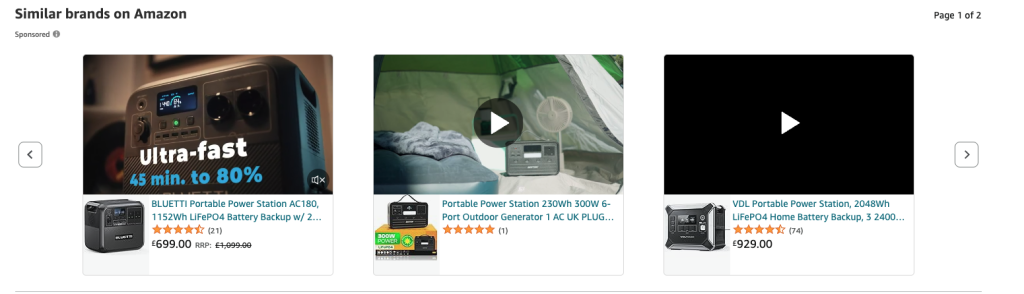
Amazon uses this well. When you look at one product, they show you others just like it, right underneath. You don’t have to search anywhere else. Just compare and decide. It works because it takes the effort away from the buyer completely.
See also
- The Also Bought Effect
- The Popular Effect
- The Similar Effect
- The Comparison Effect
- 180+ ways to improve conversion
- 140+ ways to be easier to buy from