Troubleshooting

YouTube thumbnailYouTube icon


Practical Sales Training™ > How To Keep Your Clients Happy > Troubleshooting


Solid black background dark banner with no visible content or imagery
 

Troubleshooting

TLDR: Give buyers clear steps to fix their own issues, and support calls drop without any extra work.


What Is It

Providing specific and detailed instructions for solving issues is a great way to help your buyer. It lets them take control of urgent issues. It also keeps unnecessary calls and emails to a minimum.

So the goal isn’t just to answer questions faster. It’s to stop the question needing to be asked at all.

A good troubleshooting guide does the support job before support even gets involved.

Why Does It Work

It works because it provides specific instructions, based on real events and issues your buyer might face.

I much prefer to solve an issue myself in the first instance, rather than call or submit a ticket. It usually means I get a quicker resolution.

So most people would rather fix it themselves if they genuinely can. A clear guide gives them exactly that chance.

It also reduces your own workload. Every problem a buyer solves alone is one your support team never has to touch.

How Can You Use It

List every issue your buyer could realistically face

You simply need to consider all the issues your buyer may face relating to your offering. Then give them step by step instructions on how to resolve each one.

Structure it around symptoms and possible causes

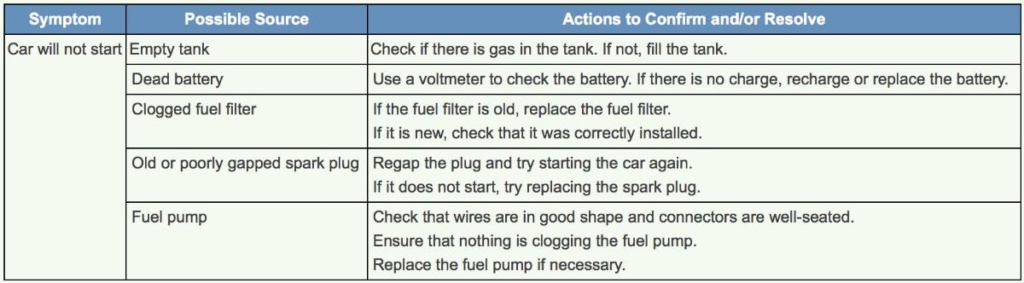
This example illustrates how you can lay out the guide. It takes into account the issue, and the multiple possible causes behind it.

When It Works Best

This works best on common, predictable problems, the ones your support team already sees again and again.

It also works best when it’s genuinely specific. Vague advice like “check your settings” helps nobody stuck on a real problem.

When It Becomes Dangerous

It backfires if the guide is too vague or generic to actually solve anything. A buyer who follows it and still fails loses confidence in you.

It also becomes risky if the guide goes out of date. Instructions that reference an old version of your product just add confusion.

Making the guide too long or too technical causes its own problem. A buyer overwhelmed by detail gives up and calls anyway.

Common Mistakes

Writing vague instead of specific steps

Writing vague, generic advice instead of specific steps leaves buyers stuck exactly where they started.

Letting the guide fall out of date

Letting the guide fall out of date means it eventually describes a version of your product that no longer exists.

Overloading each step with technical detail

Overloading each issue with too much technical detail scares buyers away from trying to fix it themselves at all.

Troubleshooting – An Example

A “Car Will Not Start” Guide

This table breaks a single symptom, “car will not start,” into five possible causes. Each cause gets its own clear, checkable action.

A buyer scans down the list, finds the cause that matches their situation, and follows the exact steps to fix it, without ever needing to call anyone.


Table of car wont start symptoms possible sources and troubleshooting steps empty tank dead battery clogged fuel filter old spark plug fuel pump
 

See also

 
Black background with a large white troubleshooting title left shows a magnifying glass over a white warning triangle icon right text explains providing step by step instructions to resolve problems and reduce calls and emails clear sales message logo at bottom

author avatar
James Newell Creator: Clear Sales Message™
James Newell specialises in sales messaging, buyer psychology and commercial communication that helps businesses increase conversion.


Advertising banner offering free daily sales tips with envelope icon and dailysellingtips Com logo